//TeaPay · UPI for hot beverage machines
Turn the beverage machine you already own into a UPI vending machine.
TeaPay adds a touchscreen, UPI payment and a management app to ordinary switch-based hot beverage machines. Customers order and pay for themselves, drinks pour one at a time at their pace, and every cup lands in your reports.
- Pay by UPI
- Multi-drink orders
- Wi-Fi or SIM
- OTA updates
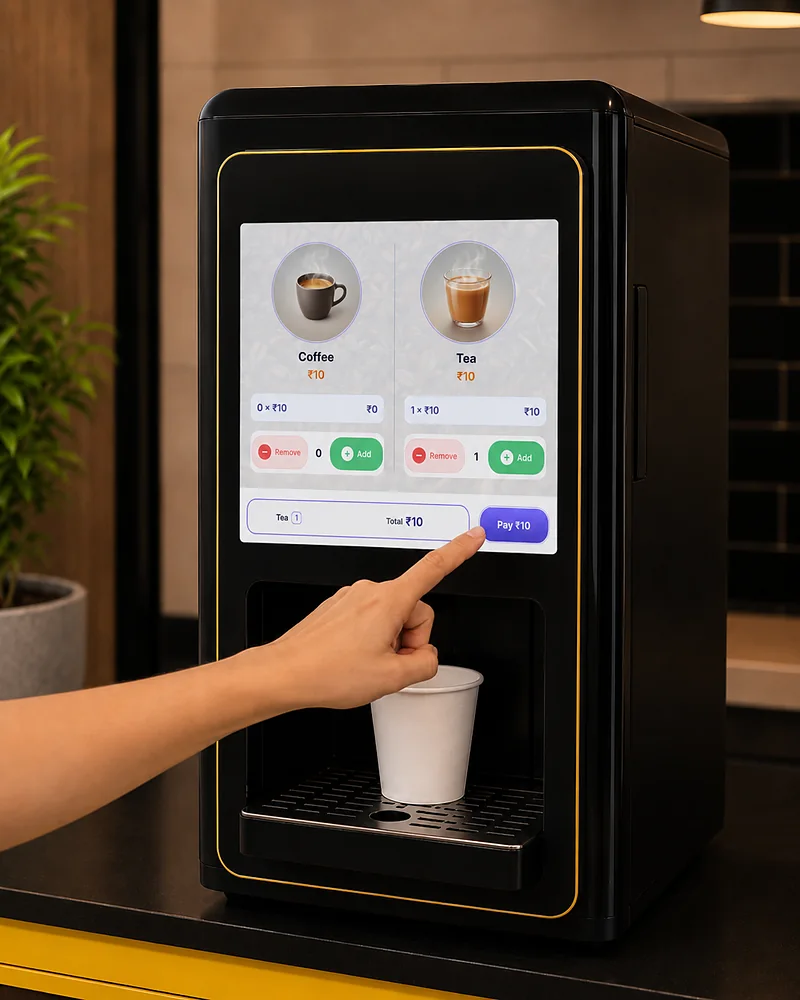
01Order on the machine 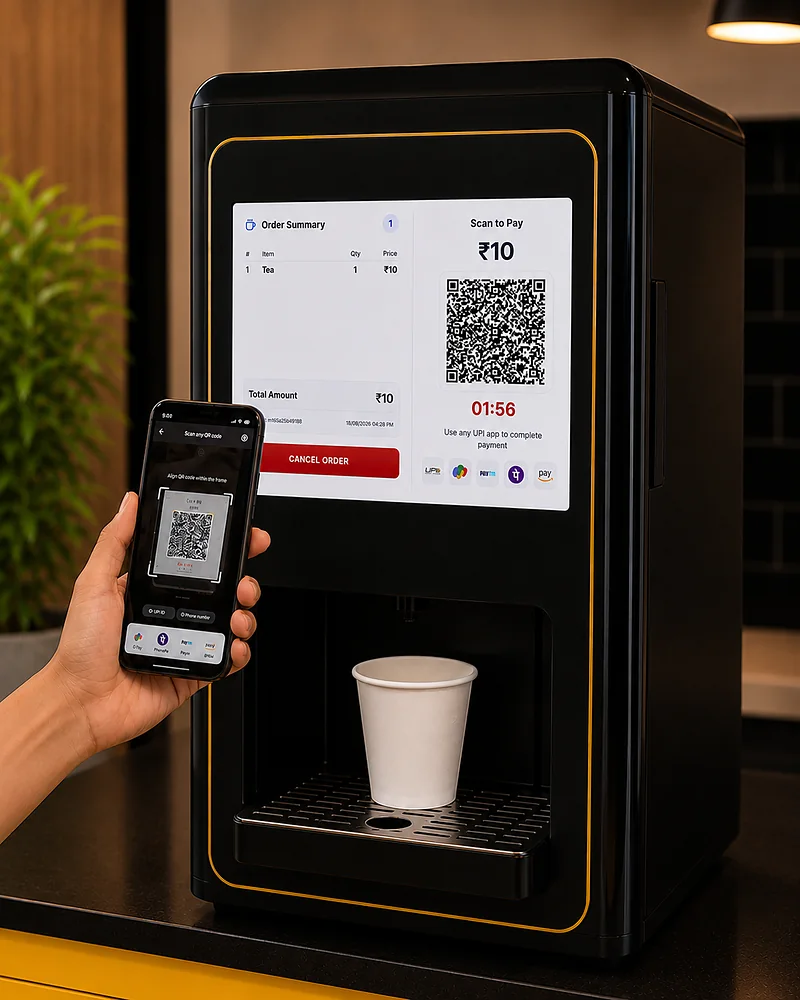
02Pay with any UPI app 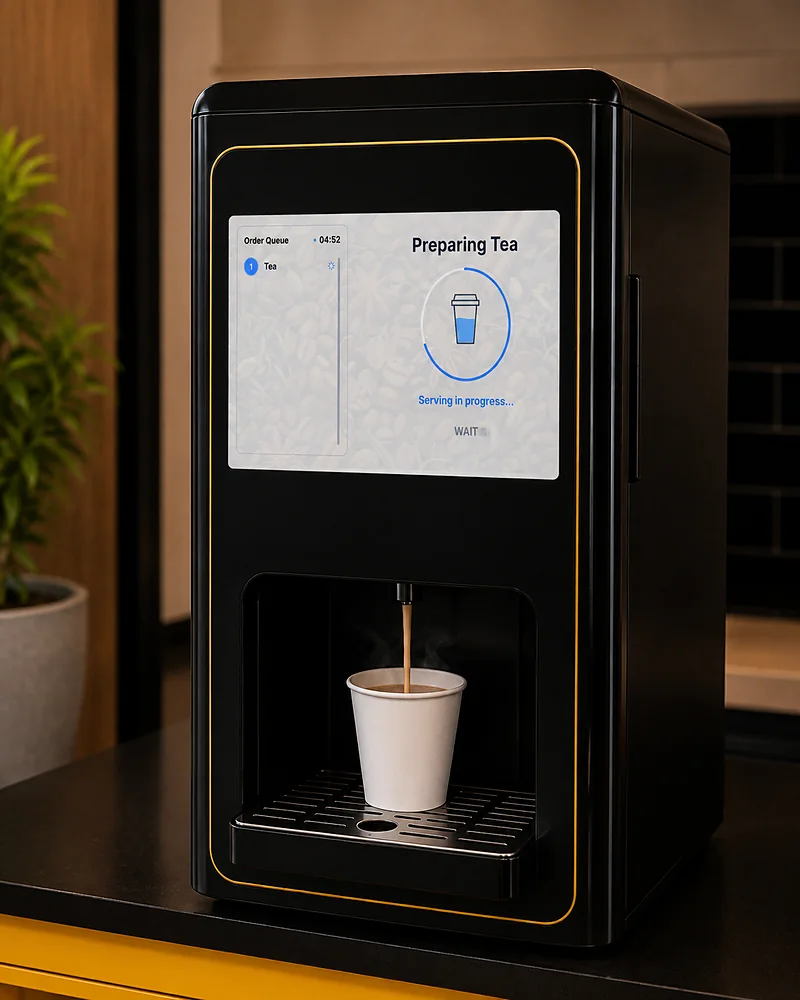
03Dispense at your pace
//The idea
Nothing about your machine has to change
Smart vending machines are sold as replacements. Yours works fine — it just cannot take a payment or tell you what it sold. TeaPay fills in only the missing half.
- 01
What you already have
A switch-based machine
Premix cans, a nozzle for each, and a push switch per drink. Someone has to stand beside it, take cash and make change — and nobody really knows how many cups it sold today.
- 02
What TeaPay adds
A screen that takes payment
A touchscreen that takes the order and the money, connected to the drinks your machine already makes, on Wi-Fi or its own SIM. Fitted on — nothing is replaced.
- 03
What you end up with
A smart vending machine
Customers order and pay by UPI themselves. Every cup is recorded against the machine. Prices, stock and status live in an app on your phone. Same machine, same brew.
//The finished unit
What your customer walks up to
Your machine, your artwork around it — and the TeaPay screen set into the front, where a row of push switches used to be.
Screen on the machine
Set into the machine's own front, at the height a person reads it and wired to the drinks it already makes — not a tablet propped up beside it.
Your artwork, not ours
The panel around the screen, and the screen itself between orders, carry your name and your artwork. Nothing a customer looks at says TeaPay.
A QR for that order
The amount on screen belongs to that customer's order and expires with it. No shared QR taped to the front, and nothing to count at the end of the day.
The queue, in the open
A multi-drink order is listed on screen and poured one cup at a time, so the customer can see what is still coming and nothing runs before there's a cup under the nozzle.
//The customer flow
Three taps from thirsty to served
No app to install, no card reader, no attendant. The whole transaction happens on the machine's own screen.
- 01
Order on the machine
Tap through the menu on the built-in touchscreen. Add several drinks, adjust quantities, see the total build up live.
- 02
Pay with any UPI app
A QR for the exact amount of that order appears on screen. Scan with GPay, PhonePe, Paytm — anything UPI. The machine confirms the moment the payment lands.
- 03
Dispense at your pace
Drinks are released one at a time, under the customer's control. Place a cup, press dispense, repeat. Nothing is poured before there's a cup under the nozzle.
A working replica of the screen your customers use. Touch it — add drinks, pay, dispense.
//On the machine
What your customer sees and touches
The screen is part of the machine, not a tablet propped up beside it. It comes on with the machine, keeps its place through a network blip, and behaves like an appliance rather than a website.
Multi-drink cart
Customers queue up several drinks in one order and pay once, instead of one transaction per cup.
A QR for the exact amount
Every order gets its own QR for exactly what is owed. Nothing to type in, no shared QR taped to the machine, no arguments about what was paid.
Customer-paced dispensing
Each drink waits for the customer to press dispense, so a five-cup order does not end up poured onto the drip tray.
Idle ad slideshow
The screen earns its keep between orders, playing your own promo slides and waking on touch.
Per-machine branding
Your logo and background art show on the order screen, so the machine looks like your brand and not ours.
//Day-to-day operations
Every machine, every cup, on one screen
The TeaPay management app installs straight onto your phone, or opens in any browser — no app store, nothing to keep updated. Sales, prices, stock, live status and remote control for every machine you run, wherever you are.
Low stock alert
coffee (2 machines) · tea (3) · water (1)
Last 30 days revenue
₹48,920.00
Orders
2,847
Success rate
98.2%
Machines
24
Top machines
| Name | Orders | Revenue |
|---|---|---|
| CITY HOSPITAL OPD | 412 | ₹7,240.50 |
| METRO TECH PARK | 389 | ₹6,880.00 |
| GREENFIELD CAMPUS | 336 | ₹5,940.25 |
| SEAVIEW CANTEEN | 291 | ₹5,120.00 |
| RIVERSIDE CLINIC | 268 | ₹4,760.75 |
Stock left
tap for machine by machine- CoffeeLow stock in 2 machines640cups
- TeaLow stock in 3 machines815cups
- WaterLow stock in 1 machine2140cups
What sold
2,847
Orders
- Coffee1,74261.2%
- Tea1,10538.8%
Live machine overview
synced 6m ago| Machine | Status | ||||||
|---|---|---|---|---|---|---|---|
| Metro Tech Park | North | Online | 12s ago | WI-FI | 2x coffee, 1x tea 3m ago | W91%D78% | 1.0.8 |
| City Hospital OPD | — | Online | 41s ago | SIM | 1x tea 8m ago | W48%D36% | 1.0.8 |
| Campus Canteen 2 | South | Offline | 2h ago | WI-FI | 1x coffee 2h ago | W19%D12% | 1.0.6 |
Sales reports and analytics
Revenue and cups broken down by machine, drink and period, kept order by order rather than sampled.
Price control per drink
Change the price of any drink on any machine and it takes effect on the screen without anyone visiting the site.
Stock and refill tracking
Remaining cups tracked per drink, with a refill history so you know who topped up what and when.
Live machine status
See which machines are working right now, when each was last in touch, and whether it is on Wi-Fi or its SIM.
Remote machine control
Start a cleaning cycle, push new settings, or take a machine out of service — from wherever you are.
Groups, users and roles
Organise machines into groups and assign staff to them, so a refill technician sees only their own sites.
Push notifications
Get told when a machine stops responding, a drink runs low, or a cleaning cycle is overdue.
//Reliability and support
The part nobody sees, that decides whether it works
A payment terminal that lives in a food court has to be dull and dependable. This is the part we spend the most time on.
OTA software updates
When a new release is out, it shows up in your management app and you update the machines you choose, when it suits you. No waiting for anyone to get around to your machine, and nobody opens a panel.
Only your account decides
A machine takes instructions from your account and nowhere else, and everything it sends back travels over a secured connection. Staff see only the sites you give them.
Wi-Fi or mobile data
Each machine runs on the site's Wi-Fi or its own SIM, set up on site in minutes. No laptop, no cabling, no engineer for the second machine.
Dedicated TeaPay server
TeaPay has its own server, run and watched by us. When something needs attention it is our own team on it, not a support queue somewhere else.
Checked before it sells
A newly installed machine is put through a full test of every drink and its connection before it is allowed to take its first payment.
Fails visibly, not silently
No connection, or a payment that never confirmed: the machine says so on screen and stops selling rather than taking money it cannot honour. A drink it has no stock for is never on the menu in the first place.
- Ordering
- Built-in touchscreen
- Payment
- Any UPI app
- Per order
- Several drinks, one payment
- Connectivity
- Wi-Fi or SIM
- Updates
- From the app, when you choose
- Management
- App on your phone
//Questions
The questions owners ask first
Do I have to replace my existing beverage machine?
No. That is the whole point. TeaPay fits onto the switch-based machine you already run — the same drinks, made the same way, with a payment screen in front of them. Your machine keeps brewing exactly as it did.
How is it fitted to my machines?
We go through one of your machines ourselves rather than working from a photo, and if a machine needs more than the screen wired in, we do that work too. Once a model is worked out every machine of that model takes the same setup, so machines go through in numbers — and every drink on every machine is bought and poured as a test before it is allowed to sell.
What happens if the internet drops mid-order?
The machine will not accept an order it cannot confirm payment for. If it loses its connection it stops selling and says so on screen, so you never end up owing a customer a drink that was paid for. Machines on mobile data ride out a Wi-Fi outage entirely.
How does the money reach me?
Straight into your own UPI account — TeaPay never holds your takings. Every order is also recorded against the machine that sold it, so you can see what each machine earned without adding up receipts.
Can one customer buy several drinks at once?
Yes. They build up an order on the screen, pay one UPI amount for the lot, then dispense the drinks one at a time as cups become free. How many fit in one order depends on the machine — it will not sell more cups than it has the water and stock to pour.
How many machines can I run on one account?
As many as you like — one account, many machines, grouped by site, with staff assigned per group. A handful of machines and a several-hundred-machine operation use the same system.
Something specific about your machines? Ask us directly.
//Get started
See it running on your own machine
Tell us what machines you run and where. We will walk you through the screen your customers use, the app you would run it from, and what fitting your model involves.